Part cashbook, part income and expense manager: the same TallyKnot ledgers you keep on your Android phone, now on the web. Add and edit cash in / cash out entries with a keyboard, invite members, turn your records into charts, and download any ledger as Excel or PDF — nothing to install.
TallyKnot works as a simple cashbook and as a full income and expense manager: sign in from any browser with the same account you use on your phone, and every ledger, every entry and every member is already there.
Create separate cashbooks for personal, family, a trip, a project or a small shop — right from the browser.
Record cash in and cash out with a full keyboard, and edit or delete any entry whenever you need to.
Organize entries with categories and a payment method — cash, card, bank transfer and more.
Invite people by email and manage who has access to each ledger, without sharing your password.
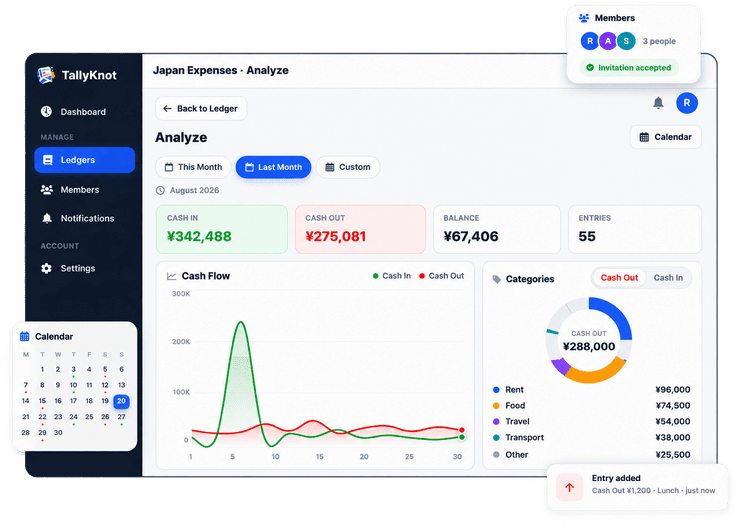
See cash flow over time and break spending down by category, member and payment method.
Every day with money movement gets a dot. Pick a day to see exactly what came in and went out.
The same account and the same ledgers as the Android app, kept up to date automatically.
Download any ledger as an Excel spreadsheet or a print-ready PDF report — all entries, or just the dates you choose.
Switch between this month, last month or a custom range, watch the cash flow chart draw itself, and break spending down by category — all on the same Analyze page shown below.
This month
Pick all entries or a date range, choose a format, and your file downloads straight away — ready to share with your accountant, print for your records, or work with in a spreadsheet.
Sort, filter and work with your numbers.
A clean report to print, share or keep.
There is nothing to install. Open your browser, sign in, and everything you've recorded on your phone is already there — or start fresh with a brand new ledger.
Use the same email and password as the Android app. New here? Create a free account in a minute.
Your cashbooks from the app are already here, with their balances. Start a new one for anything you track.
Record cash in and cash out with all the details, and invite members by email to share the ledger.
See where the money goes in charts, and open the calendar to look at any single day.
This is a working preview of the ledger screen, seeded with a few sample entries. Add one, edit one, or delete one — the same “Add Entry” form and fields as the real dashboard.
Nothing here is saved anywhere. It lives only in this browser tab, so reloading the page (or leaving) resets it back to the sample entries.
| Type | Amount | Party | Category | Payment | By | Date |
|---|
TallyKnot Local is the full cashbook in your browser: your own ledgers, entries, charts and calendar, saved on this device.
Everything above — ledgers, entries, members, analytics and Excel & PDF downloads — is included at no cost. Sign up once and use the exact same account on Android and on the web.
Create a free account, add your first entry, and invite anyone who needs to see the same cashbook. Already have the Android app? Sign in on the web with the same account.
 TallyKnot